Sections
Overview
I've been running the same infrastructure for quite a while now and want to share how it works!
anardil.net is a cluster of 17 websites. You can find links for each at
goto.anardil.net, my launch page. This set up has been exceptionally
reliable, dead simple, very fast, and all for $10/month.
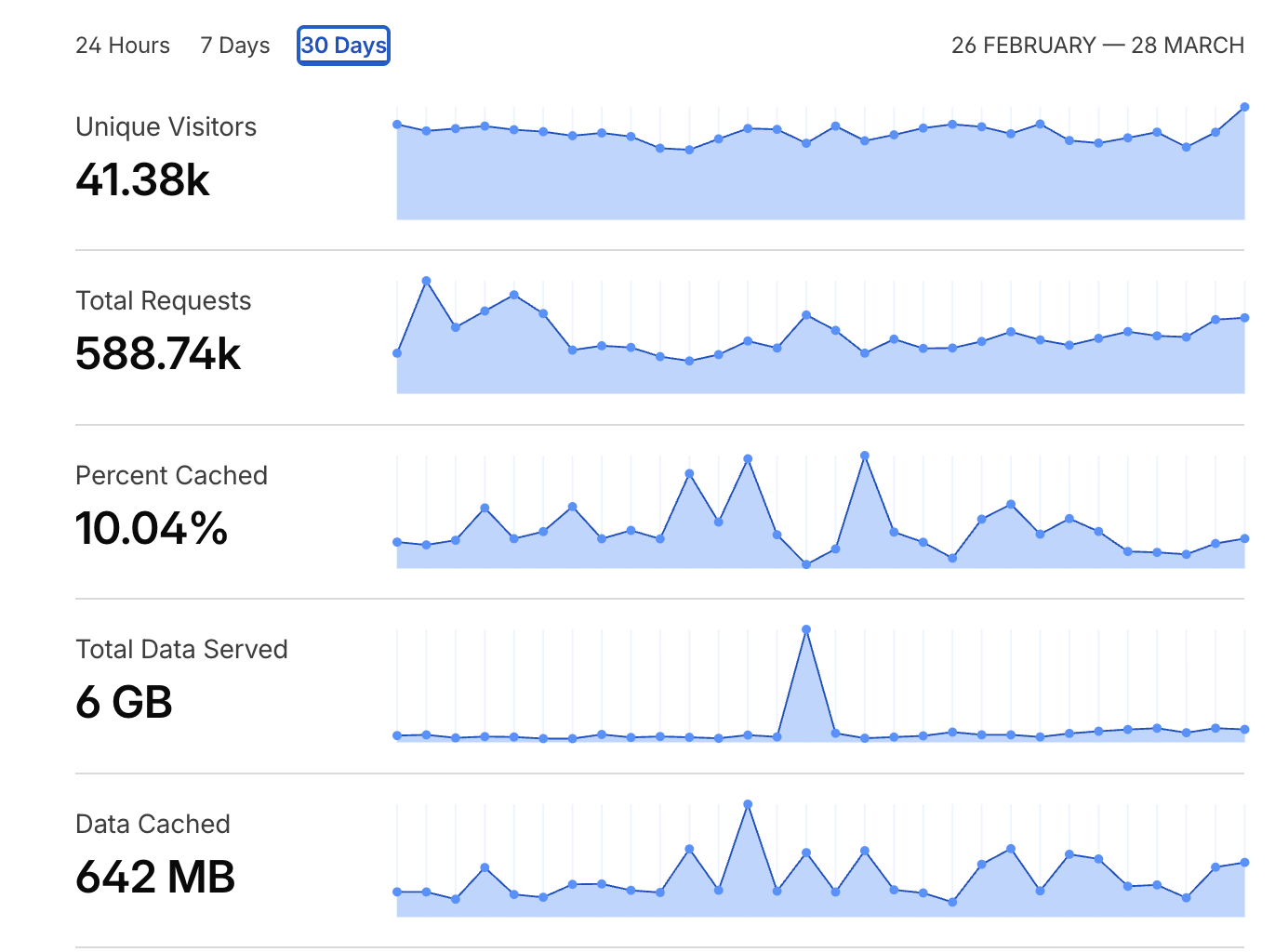
Here's an overview of the last month:
DNS
I use the Cloudflare Nameservers for the domain even though the registrar is still Dreamhost. I prepay for the domain in 3 year blocks. I use Cloudflare to manage all the external DNS records.
There are two root A records, one for the Digital Ocean VPS (walnut) and one for my house (home). The VPS's IPv4 address is static, but the modem at my house can be assigned a different IPv4 address at any time, so DDNS is required.
I pay Cloudflare $5/month for a load balancer, which is configured to route traffic pointing at dynamic.anardil.net to walnut.anardil.net 100% of the time, home.anardil.net 0% of the time. Failover is enabled though, so if walnut is down, then home becomes the primary. This is overkill honestly, but it does take the stress out rebooting/managing the VPS. I have an example of a simpler model below.
Each of the website records are CNAME records pointing at dynamic.anardil.net. For instance:
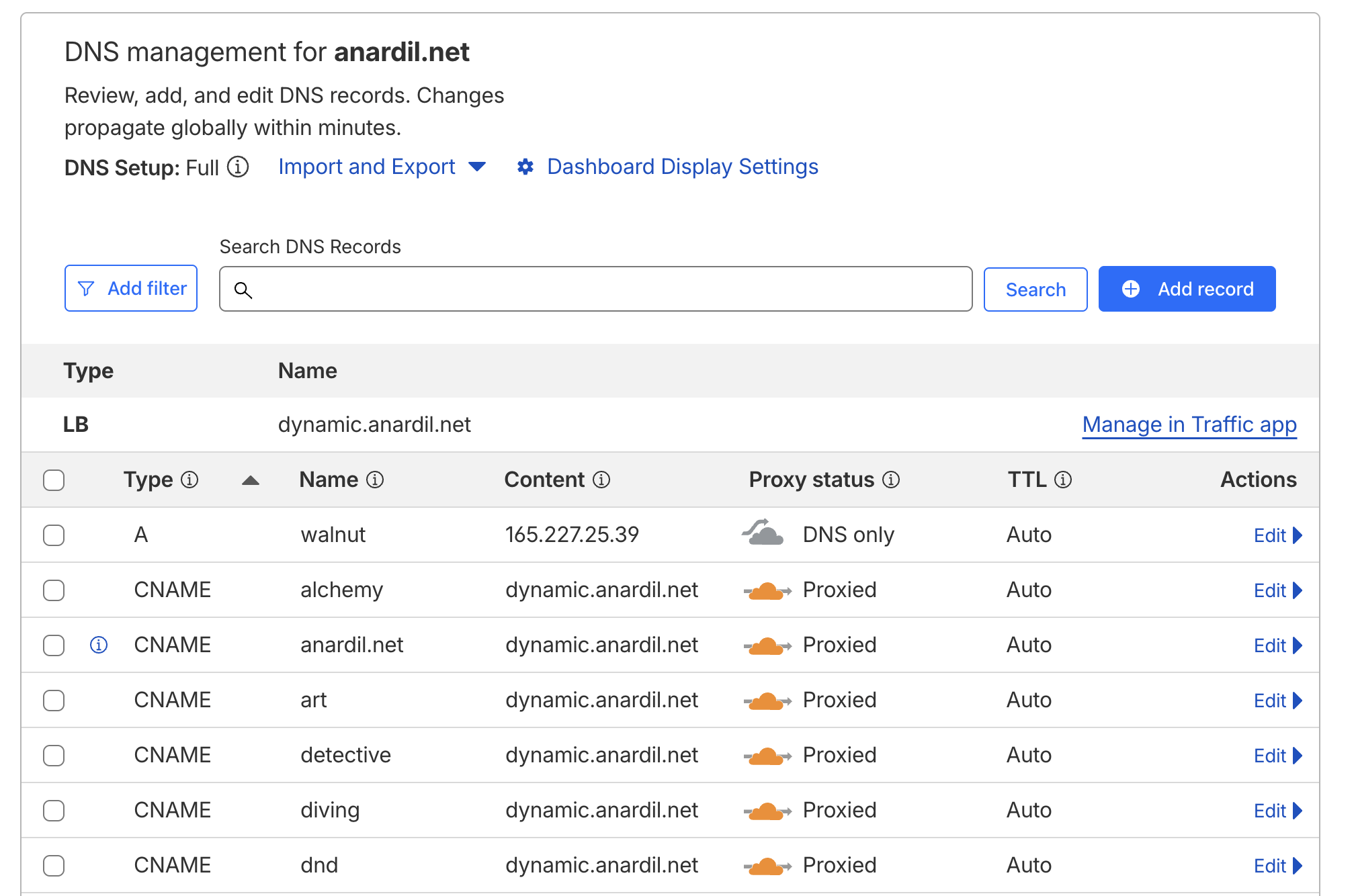
Two websites (status.anardil.net and sensors.anardil.net) host live data. The CNAME records for these point only to home.anardil.net. There's a reliability penalty but the benefit is that I'm not syncing changes to walnut continuously.
To summarize:
| Load Balancer | Target | Weight |
|---|---|---|
| dynamic | walnut.anardil.net | 100% |
| dynamic | home.anardil.net | 0% |
| DNS Record | Host | Target |
|---|---|---|
| A | walnut.anardil.net | 165.227.25.39 |
| A | home.anardil.net | ?.?.?.? |
| CNAME | goto | dynamic.anardil.net |
| CNAME | diving | dynamic.anardil.net |
| CNAME | ... | ... |
| CNAME | status | home.anardil.net |
| CNAME | ... | ... |
An alternative simpler model without the load balancer and self hosting:
| DNS Record | Host | Target |
|---|---|---|
| A | walnut.anardil.net | 165.227.25.39 |
| CNAME | goto | walnut.anardil.net |
| CNAME | diving | walnut.anardil.net |
| CNAME | ... | ... |
Machines
For context, there are 3 important machines involved here:
walnut
Ubuntu 22.04 Digital Ocean VPS, 1 CPU, 1 GB RAM, 30 GB SSD, $5/month. This runs passwordless SSH, nginx, and that's it! I had a $10/month VPS for nearly a decade but downsized when I upgraded to Ubuntu 22.04 from 14.04.
I take pains to make sure web assets are extremely optimized, so the storage requirements are very small. Larger assets (like videos) are hosted on Digital Ocean's S3, but none of this infrastructure relies on that.
web
FreeBSD jail running on my NAS at home. This runs passwordless SSH and nginx, the same as walnut. Port forwarding points TCP/443 from my router here. Cloudflare never makes non-TLS requests, so there's no need to forward port 80.
willow
Macbook Air. This is where I develop websites, test changes locally, and push new versions from. More in the development section.
HTTP Server
I run identical nginx configs on walnut and web. You can see the full unabridged configuration here. Virtual hosting allows a single nginx instance to respond for any number of websites and route them appropriately based on the Host field in the HTTP request. Every website is completely static, meaning that nginx's only job is to serve files from the file system.
Each website gets its own folder.
[email protected] /V/s/h/web> ls
alchemy/    dnd/        overviewer/ sensors/
artwork/    games/      photos/     status/
detective/  goto/       pirates/    timelapse/
diving/     live/       public/     www/
Each folder follows approximately the same shape; an index.html, which then references other resources as required.
[email protected] /V/s/h/web> ls photos/
favicon.ico           jquery.fancybox.min.css
images.da32a7e98f.js  jquery.fancybox.min.js
images.js             large/
index.html            small/
jquery-3.6.0.min.js
Back to the nginx config, most websites only need the following:
server {
    server_name  photos.anardil.net;
    listen       443 ssl http2;
    root         /mnt/web/photos;
    index        index.html;
}
For websites that have multiple pages like diving.anardil.net or
goto.anardil.net, I have a block that routes requests for /something
to /something.html, so the URLs can be cleaner.
location / {
    try_files $uri $uri/ @htmlext;
}
location ~ \.html$ {
    try_files $uri =404;
}
location @htmlext {
    rewrite ^(.*)$ $1.html break;
}
This allows goto.anardil.net/projects links instead of just goto.anardil.net/projects.html (which still works too of course).
TLS
Because Cloudflare fronts all the traffic for the domain, they handle the public TLS certificates and client negotiation.
walnut and web use a single self signed certificate. It's not important that this is trusted by clients because they never see it. Cloudflare is configured to use "Full" encryption mode, rather than "Full Strict", so ignores that the cerificate is self signed.
Resource TTLs
Caching for Cloudflare and perhaps more importantly, client devices, is controlled by resource TTLs. Too long and you need to deal with cache busting or other schemes to push updates. Too short and you hurt performance for both the server and the client by requiring more requests.
map $sent_http_content_type $expires {
    default                    off;
    text/html                  5m;
    text/css                   7d;
    application/javascript     7d;
    ~image/                    max;
    ~video/                    max;
}
expires    $expires;
add_header Pragma public;
add_header Cache-Control "public";
Sometimes I want a specific resource to never be cached despite the default rules, and that's pretty easy too.
server {
    server_name  sensors.anardil.net;
    listen       443 ssl http2;
    root         /mnt/web/sensors;
    index        index.html;

    location = /data.js {
        expires    0;
        add_header Cache-Control "no-cache, no-store, must-revalidate";
        add_header Pragma "no-cache";
    }
}
Development
Each website project has the same goal: produce an index.html and whatever resources are required to go along with it. Usually that means an style.css, main.js, and some kind of application data. Let's look at photos.anardil.net as an example.
The source is essentially the same as github.com/gandalf-/gallery.sh, which produces output like the following:
[email protected] ~/w/o/photos> ls
favicon.ico             index.html              jquery.fancybox.min.js
images.da32a7e98f.js    jquery-3.6.0.min.js     large/
images.js               jquery.fancybox.min.css small/
A much more complex example is diving.anardil.net, with the source available at github.com/gandalf-/diving, but the eventual result is in the same shape.
[email protected] ~/w/o/diving-web> l
clips/                    jquery.fancybox.min.js    sites/                    timeline/
detective/                profile.json              stats/                    timeline.js
favicon.ico               robots.txt                stats.css                 video/
full/                     search-data-0a3ca5d3c1.js stats.js                  video-0edd355997.js
gallery/                  search-data-78757f1a9f.js style-69fa3814c7.css      video-23abd75e21.js
game.js                   search-data-79cf17175a.js style-7b41f65616.css      video-27d313185a.js
game.spec.js              search-data.js            style-8c144b47fa.css      video-4758539754.js
imgs/                     search-f6fb1da4f2.js      style-92b55b5ec2.css      video-aa9dbb5783.js
index.html                search.js                 style-b742b0f44c.css      video.js
jquery-3.6.0.min.js       search.spec.js            style.css
jquery.fancybox.min.css   sitemap.xml               taxonomy/
One of my favorite parts of this flow is that there are never any surprises in production. The local view only requires a web server to view, and is always identical to what's published. As bonus, there isn't any service management besides running a single nginx instance.
Deployment
When I'm happy with the development results locally, all it takes to deploy is rsync. Usually
something in the shape of:
rsync \
  --human-readable \
  --archive \
  --delete \
  --info=progress2 \
  ~/working/tmp/photos/ \
  web:/mnt/web/photos/
For a single-server setup, you would just run one rsync command directly to your VPS. For me, it's two hops because I want to keep walnut and web in sync at all times.
Conclusion
Fully static sites are fast, dead simple, and still plenty flexible. If you dig into caching rules, even hosting sites with live data is a breeze.